
WhatsApp Auto-Reply: Guide for Hosts and Property Managers
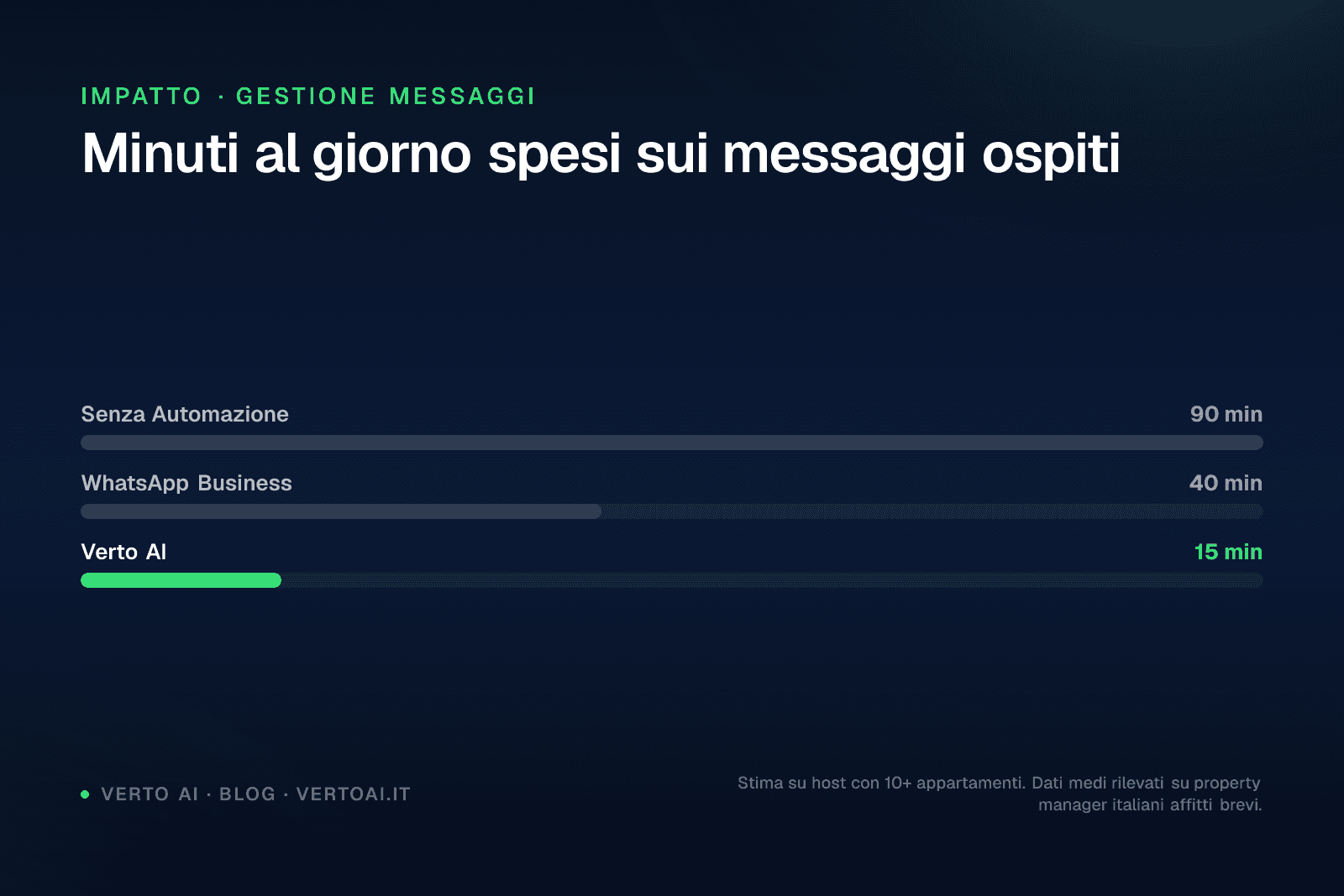
Setting up a WhatsApp auto-reply reduces average daily message-handling time from 90 minutes to under 15 for anyone managing 10 or more properties. This guide explains how to do it with the free WhatsApp Business app, when its limitations become a real operational problem, and what alternatives exist for property managers with multiple units.
Capitolo 01 / 07
01 — Why WhatsApp Auto-Reply Has Become Essential
Short-term rental guests expect a reply within 5–10 minutes, regardless of the time of day. According to Airbnb 2025 data, response rate directly affects listing visibility: hosts with a rate above 90% achieve an average of 23% higher visibility compared to those who respond inconsistently.
WhatsApp is the preferred channel for Italian and European guests: over 70% of pre- and post-check-in communication happens on this platform, not via email or SMS. This creates a precise operational problem: anyone managing 5 or more properties receives an average of 40–60 messages per day covering check-ins, check-outs, information requests, and issue reports.
A WhatsApp auto-reply doesn't solve everything, but it covers the most frequent cases — arrival times, access codes, Wi-Fi, house rules — without manual intervention.
Dato
On average, 65% of messages received by a property manager concern information already available in the house guide or booking confirmation.
Capitolo 02 / 07
02 — How to Set Up Auto-Reply on WhatsApp Business (Free)
WhatsApp Business, the free app for small businesses, offers three basic automation features: a welcome message, an away message, and quick replies. Here's how to configure them.
Welcome Message
The welcome message is sent automatically the first time a contact messages you, or after 14 days of inactivity.
Step 1Open WhatsApp Business → Settings → Business Tools → Welcome Message.
Step 2Toggle it on and tap the edit icon to customise the text.
Step 3Choose who receives it: everyone, contacts not in your address book, or a specific list.
Tip
Write the welcome message in both Italian and English within the same text, separated by a blank line. This covers 90% of European guests without any additional configuration.
Away Message
The away message is sent when you are offline or outside your configured hours.
Step 1Settings → Business Tools → Away Message.
Step 2Toggle it on and set the schedule (e.g. 10 PM–8 AM).
Step 3Customise the text to indicate when you will reply and, if possible, include an emergency number for urgent issues.
Attenzione
The away message cannot distinguish between a guest asking for the Wi-Fi code at 11 PM and one reporting an emergency. Both receive the same generic text.
Quick Replies
Quick replies are text shortcuts you can send manually by typing "/" followed by a keyword.
Step 1Settings → Business Tools → Quick Replies.
Step 2Create a reply (e.g. /wifi → text with network name and password).
Step 3In a chat, type "/wifi" and select the reply from the list.
Quick replies are not automatic: they still require you to open your phone and send them. They are useful for speeding up manual responses, not for eliminating human intervention.
Percorso
Livelli di automazione risposta WhatsApp
Risposta manuale
€0Ogni messaggio gestito a mano, nessuna automazione. Tempo medio: 90 min/giorno per 10 apt.
WhatsApp Business (gratuito)
€0Messaggio di benvenuto, assenza e risposte rapide. Testo fisso, nessuna integrazione PMS.
API WhatsApp + flussi base
~€15/apt/meseFlussi IF/THEN configurati manualmente. Risponde a domande previste, non a varianti.
Verto AI
da €21,90/apt/meseAI conversazionale su API Meta ufficiale. Multilingua, integrazione PMS live, 24/7. Risponde a domande non previste.
Capitolo 03 / 07
03 — The Real Limits of Free WhatsApp Business
The free app works fine for managing 1–3 properties with predictable flows. Beyond that threshold, the limitations become operational.
| Feature | WhatsApp Business (free) | WhatsApp Business API |
|---|---|---|
| Auto-reply | Welcome and away only | Custom flows |
| Multilingual | No (fixed text) | Yes, automatic detection |
| PMS integration | No | Yes (Smoobu, Lodgify, etc.) |
| Multiple devices | Max 5 (linked) | Unlimited |
| Voice note input | Manual listening | Transcription and AI reply |
| Photo input | Manual viewing | Contextual analysis and reply |
| Reply schedule | Configurable, fixed text | 24/7, contextual reply |
| Cost | €0 | From €21.90/unit/month |
The main issue isn't the zero cost of the free app — it's the hidden cost of time. A property manager handling 15 properties who manually replies to 50 messages a day spends an average of 90 minutes on guest communication alone. At an opportunity cost of €30/hour, that's €45 per day, over €1,300 per month.
"I tried using away messages to cover the night, but guests arriving late were frustrated to receive a generic reply instead of the access code."
— Property manager, 12 properties, Bologna
A second limitation involves multilingual support. The free app does not detect the guest's language: if you write in Italian, it replies in Italian even to guests who wrote in English, German, or French. For short-term rentals with international guests, this creates immediate friction.
Dato
42% of foreign guests in Italy report having experienced communication difficulties with their host during their stay (source: Statista Travel 2025).
Capitolo 04 / 07
04 — When It Makes Sense to Move to the WhatsApp API
The official WhatsApp API (Meta Business API) is the foundation on which solutions like Verto AI are built. It is not an app you download on your smartphone: it is an infrastructure that allows you to connect WhatsApp to external systems, manage conversations programmatically, and integrate artificial intelligence.
What Changes Compared to the Free App
With the API, WhatsApp auto-reply becomes contextual. It is not a fixed text: the AI reads the guest's message, understands what they are asking, and responds with the correct information for that specific booking.
Practical example: a guest writes at 11:15 PM "Hi, I've arrived but I can't find the intercom." An API-based system integrated with the PMS retrieves the exact address, access instructions, and apartment number from the booking, and replies in under 10 seconds in the guest's language.
In this scenario, the free app would send the configured away message, leaving the guest outside the door.
When the Switch Is Justified
- You manage 5 or more properties
- You receive messages in multiple languages (English, German, French, Spanish)
- You have guests who arrive or message outside working hours
- You use a PMS (Smoobu, Lodgify, Hostaway) and want to sync data
- You want to reduce response time to under 2 minutes, even at night
- You have received negative reviews for slow responses
If you checked 3 or more items, the cost of an API solution is likely lower than the cost of the time you are spending today.
For a deeper look at automating your entire guest communication workflow, read how to automate guest messages on Airbnb.
Dato
Tempo gestione messaggi ospiti (10 appartamenti)
Capitolo 05 / 07
05 — Verto AI: WhatsApp Auto-Reply for Property Managers
Verto AI is an AI concierge that replies to guests on WhatsApp on your behalf, 24 hours a day, in over 25 languages. It operates via the official Meta API — not parallel apps or workarounds — and is designed specifically for short-term rental managers in Italy.
How It Works in Practice
The guest writes on WhatsApp (text, photo, or voice note). Verto AI reads the message, retrieves booking information through integration with your PMS, and replies contextually. There are no IF/THEN rules to configure: the system understands questions phrased in different ways and responds appropriately.
The Smoobu integration is native and live: when a booking is created or updated in Smoobu, Verto AI automatically updates the information available for that guest. No file exports or manual updates required.
What It Handles Autonomously
- Pre-arrival information (check-in time, address, parking)
- Access codes and lock instructions
- Wi-Fi, appliances, heating
- House rules and check-out
- Questions about restaurants, transport, local attractions
- Issue reports (with escalation to the property manager for emergencies)
Pricing
The base plan starts at €29.90 per property per month for 1–3 units, dropping to €21.90/unit/month for 10 or more properties on an annual contract. The Analytics add-on (reports on messages, response times, frequently asked questions) costs an additional €4.90/unit/month.
There are no setup fees or booking commissions. Pricing is fixed per unit.
Tip
For a portfolio of 10 properties on an annual plan, the total monthly cost is €219. If the system saves even just 45 minutes of manual work per day, the return on investment is positive within the first month.
For a direct comparison with other tools in the sector, see our comparison page with Hospitable, which uses a rule-based system without native WhatsApp support.
Capitolo 06 / 07
06 — Conclusion: Where to Start
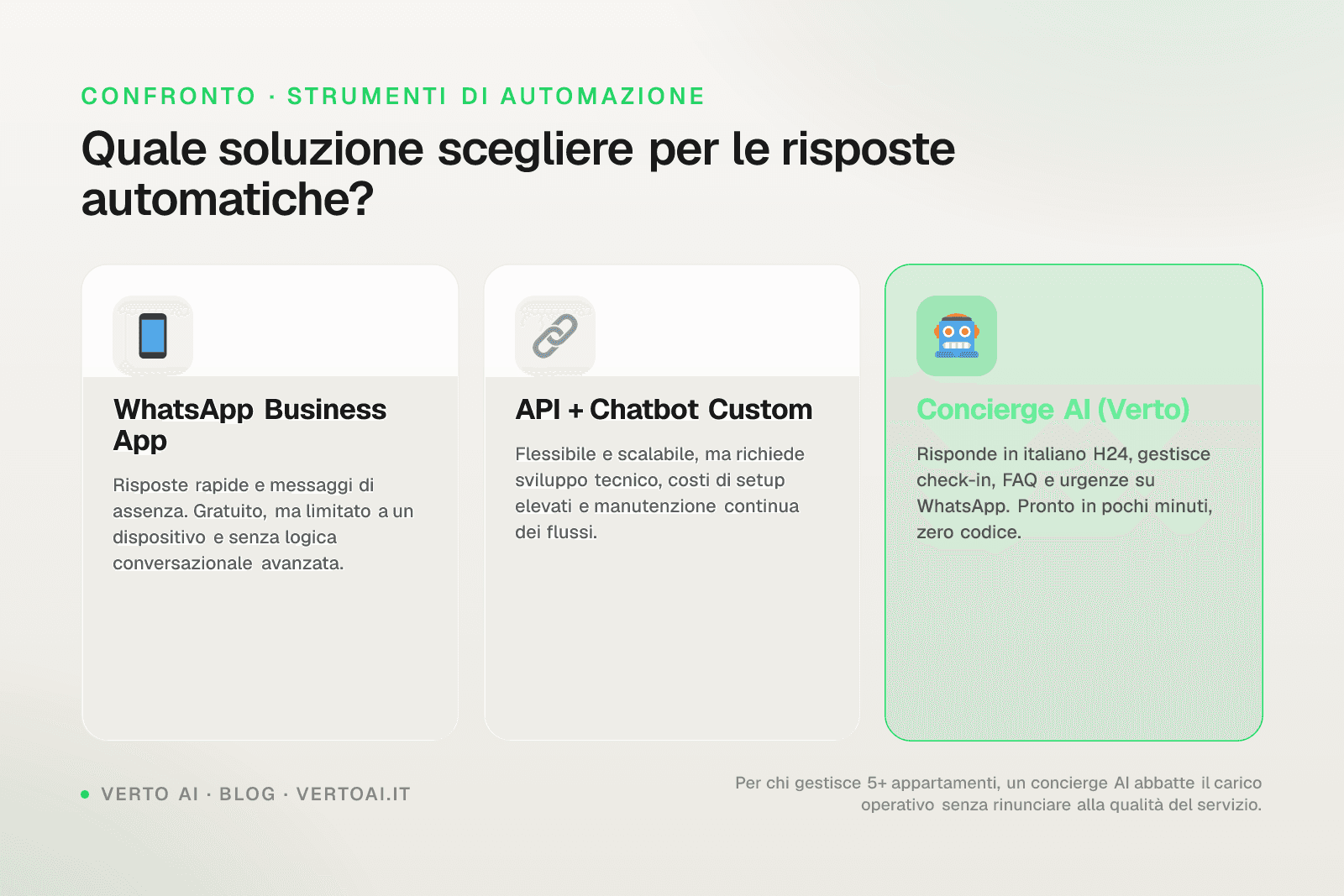
If you manage 1–3 properties with simple workflows, set up the welcome and away messages on free WhatsApp Business right now. They are better than nothing and take 10 minutes to configure.
If you manage 5 or more properties, have international guests, or receive messages outside business hours, the free app's limitations become a real cost — in time, in reviews, and in frustrated guests. In this case, an API-based solution like Verto AI covers what the app cannot.
WhatsApp auto-reply is not a luxury: it is the difference between being available 24/7 without working 24/7.
Try Verto AI free for 14 days, no credit card required. Set up your first property in under 20 minutes and see how it responds to guests before you decide.
Capitolo 07 / 07
Frequently Asked Questions
Can I use WhatsApp auto-reply without WhatsApp Business?
No. The auto-reply feature is only available in the WhatsApp Business app or via the official Meta API. The standard WhatsApp app does not offer any automation. To activate it, download WhatsApp Business, register your business number, and configure the automatic messages from the Business Tools section.
Does WhatsApp auto-reply work at night too?
Yes, but with different limitations depending on the tool. With the free app, the away message is sent during the hours you configure, but it is a fixed text that is the same for everyone. With API-based solutions like Verto AI, auto-reply is active 24/7 and responds contextually to the guest's specific question, retrieving information from the booking.
How much does it cost to set up WhatsApp Business auto-reply?
The WhatsApp Business app is free and includes welcome messages, away messages, and quick replies at no additional cost. Solutions based on the official Meta API have variable costs: Verto AI starts at €21.90 per property per month for 10 or more units on an annual plan, up to €29.90/unit/month for 1–3 properties.
Can I set up WhatsApp auto-reply in multiple languages?
With the free app, no: the automatic message text is fixed and is sent in the language you write it in. With API solutions that integrate conversational AI, yes: the system detects the language of the incoming message and replies in the same language, automatically covering guests who write in English, German, French, Spanish, and over 20 other languages.
Does WhatsApp auto-reply integrate with Airbnb or PMS platforms?
The free WhatsApp Business app does not integrate with any PMS or booking platform. API solutions can: Verto AI integrates natively with Smoobu in real time and supports Lodgify and Hostaway. This allows the system to reply with booking-specific information (times, codes, address) without any manual data entry on your part.
Keep going
Related resources
Same topic
01Want to see Verto on a real conversation?
No credit card required. Self-service setup in 30 minutes. Plugs into the channel manager you already use.